
Beschreibung
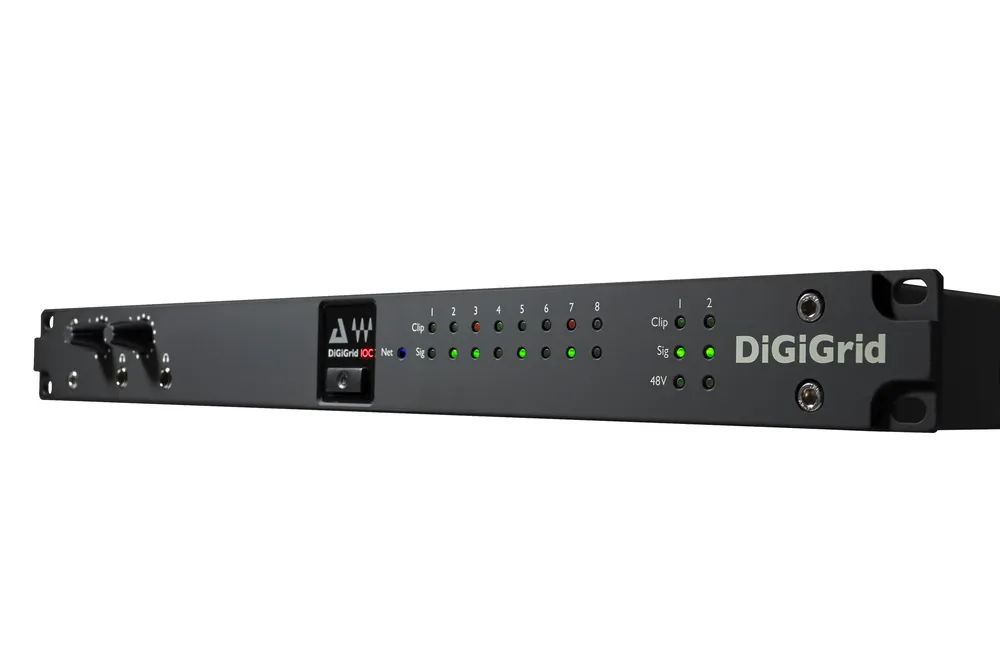
Custom-designed with the control room in mind, the DiGiGrid IOC audio interface features a variety of connectivity options: 2 mic/line inputs with broadcast-grade preamps, 8 line inputs/outputs, 16 AES inputs/outputs, an ADAT input/output, plus two powerful headphone outputs. Plug into the SoundGrid network using a single Ethernet cable, and the IOC will open up a world of real-time tracking, mixing and monitoring, with super-low latency of only 0.8 milliseconds. With the DiGiGrid IOC and a SoundGrid DSP server, you can run hundreds of SoundGrid-compatible plugins from Waves and other developers, all fully integrated within your DAW.HardwareGeneral8x line inputs (25-pin D-Con)8x line outputs (25-pin D-Con)16x AES/EBU I/O (2x 25-pin D-Con)1x ADAT I/O (8 channels @ 48kHz; 4 channels @ 96kHz; 2 channels @ 192kHz*)2x Mic inputs (XLR/TRS combo)2x SoundGrid RJ45 Ethernet ports1x Word clock I/O1x AC input2x headphone outputs with analog level knobs1U rack-mountedSupported sample rates: 44.1, 48, 88.2, 96, 176.4*, 192* kHzClock Synchronization via Word Clock input, AES/EBU, SoundGrid (SoE), InternalReset switchMultiple broadcast level format settings (jumpers on all analog I/Os) InputsMic input impedance: 2K5 OhmsPhantom power: 48VLine input impedance: 8K0 OhmsMic gain range: -20 to +60dB in 0.5dB stepsLine gain range: -30 to +50dB in 0.5dB stepsMic maximum input level: +26dBuLine maximum input level: +36dBuMic equivalent input noise: >-126dB (150 Ohm source, Gain +60dB)Frequency response: +/-0.5dB 20Hz to 20kHzChannel separation: Better than 90dB (40Hz to 15kHz) OutputsMaximum line output level: +22dBuResidual line output noise: Frequency Response: +/-0.5dB 20Hz to 20kHzLine output impedance: 50 OhmsChannel separation: Better than 90dB (40Hz to 15kHz)SoftwareThe IOC installer includes the relevant drivers and software for your unit: the SoundGrid ASIO/Core Audio driver, the SoundGrid Studio Application, the eMotion ST mixer, StudioRack, and the IOC Control Panel.The SoundGrid Studio System is the next generation of sound technology. It is a real-time processing and networking platform designed to bring your studio up to light speed. It allows your DAW to offload its plugin processing to a SoundGrid DSP server and enables your devices to communicate with one another and with the devices of the people you work with. The SoundGrid Studio System integrates seamlessly with all DAWs and DiGiGrid (or other SoundGrid-compatible) I/Os, providing endless possibilities for setups of every size—from a single DAW with one DiGiGrid I/O, to an entire network of host computers, I/Os, and SoundGrid DSP servers.The SoundGrid Studio System Gives You the Power to Do MoreReal-Time Processing – Run hundreds of plugins simultaneously.Low-Latency Monitoring – Track and rehearse with full-on plugins in near-zero latencyNetworking – Connect everything and everyone through a centralized hub.Seamless Integration – Connect multiple DAWs using the SoundGrid ASIO/Core Audio driverOpen Architecture – Compliant with SoundGrid-compatible Waves and third-party plugins. SoundGrid Studio System Software ComponentsSoundGrid Studio Application – For managing the SoundGrid network on your host computer.eMotion ST Mixer –Low-latency monitoring with SoundGrid plugins for tracking and rehearsing.StudioRack –For running plugin chains, saving and loading their presets, and offloading their processing to a SoundGrid DSP server.SoundGrid ASIO/Core Audio – Connects any DAW to the SoundGrid network as a software I/O.SoundGrid Studio ApplicationThe SoundGrid Studio Application is your tool for managing all software and hardware connected to the SoundGrid network. With its dynamic I/O mapping ability, the SoundGrid Studio Application lets you configure your SoundGrid network, manage its various components, and set up any combination of drivers and SoundGrid-compatible devices. It also enables I/O sharing between several computers, allowing you to manage their resources from your host computer.The SoundGrid Studio Application enables you to:Configure your SoundGrid ASIO/Core Audio driver and DiGiGrid I/Os. (Auto-configuration Wizard available.)Process, mix and monitor in real time (together with StudioRack and the eMotion ST mixer).Connect and patch multiple hardware devices and software I/Os.Stream audio from and to multiple host computers running different DAWs.Create and save your own configuration templates.Access the DiGiGrid I/O Control Panel for controlling the parameters of your I/O (channel input gain, phantom power, etc.).